Org mode
- Tier: Free, Premium, Ultimate
- Offering: GitLab.com, GitLab Self-Managed, GitLab Dedicated
GitLab uses the gitlab-markup gem,
which uses the org-ruby gem,
to convert Org mode content to HTML.
For a complete reference to Org mode syntax,
see the Org manual.
You can use Org mode in the following areas:
- Org mode documents (
.org) inside repositories - Snippets, when the snippet file is named with a
.orgextension - Wiki pages
Headings
Leading asterisks (*) render as headings 1 to 6.
* Heading 1
** Heading 2
*** Heading 3
**** Heading 4
***** Heading 5
****** Heading 6
#+TITLE: renders as the H1 heading at the top of the page:
#+TITLE: Welcome to Org-modeHeading anchors
GitLab automatically adds an anchor to every Org mode heading, so you can link to it.
On hover, a link to those anchors becomes visible to make it easier to copy the link to the heading to use it somewhere else.
The anchors are generated from the content of the heading according to the following rules:
- All text is converted to lowercase.
- All characters except letters, numbers, hyphens, and underscores are removed.
- All spaces are converted to hyphens.
- If a heading with the same anchor has already been generated, a unique incrementing number is appended, starting at 1.
Example:
* This heading has spaces in it
** This heading has an accent in it: Café
** This heading has Unicode in it: 日本語
** This heading has spaces in it
*** This heading has spaces in it
** This heading has 3.5 in it (& parentheses)
** This heading has  multiple spaces and - hyphens_and_underscores
Would generate the following heading anchors:
#this-heading-has-spaces-in-it#this-heading-has-an-accent-in-it-café#this-heading-has-unicode-in-it-日本語#this-heading-has-spaces-in-it-1#this-heading-has-spaces-in-it-2#this-heading-has-35-in-it--parentheses#this-heading-has--multiple-spaces-and---hyphens_and_underscores
In a snippet, headings also get a prefix derived from the filename,
to prevent anchor collisions across multiple files.
For example, a * TL;DR heading in a file named README.org
gets the anchor #readme-tldr instead of #tldr.
Lists
Org mode supports unordered lists, ordered lists, description lists, and nested lists.
Unordered lists
A hyphen (-) or a plus sign (+) creates an unordered list:
- Item one
- Item two
- Nested item+ Item one
+ Item two
+ Nested itemWhen rendered, both examples look similar to:
- Item one
- Item two
- Nested item
Ordered lists
A number followed by a period (.) or a closing parenthesis ()) creates an ordered list:
1. First item
2. Second item
1. Nested item1) First item
2) Second item
1) Nested itemWhen rendered, both examples look similar to:
- First item
- Second item
- Nested item
Description lists
- term1 :: Definition of term one
- term2 :: Definition of term two
When rendered, the example looks similar to:
- term1
- Definition of term one
- term2
- Definition of term two
Checkboxes
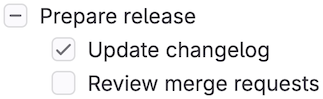
[ ], [X], and [-] after a list marker render as checkbox input elements.
[-] (partially checked) renders as an indeterminate checkbox:
- [-] Prepare release
  - [X] Update changelog
  - [ ] Review merge requests
When rendered, the example looks like:
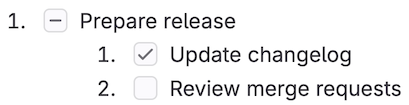
Checkboxes also work in ordered lists:
1. [-] Prepare release
   1. [X] Update changelog
   2. [ ] Review merge requests
When rendered, the example looks like:
Tables
Pipes (|) create a table.
A separator row made of dashes (-) and plus signs (+) turns the row
above it into the table header:
| Item  | Unit price ($) | Quantity | Subtotal ($) |
|-------+----------------+----------+--------------|
| Eggs  |              3 |        2 |            6 |
| Milk  |              2 |        1 |            2 |
| Bread |              1 |        3 |            3 |
|-------+----------------+----------+--------------|
| Total |                |          |           11 |
#+TBLFM: $>=$2*$3::@>$>=vsum(@I..@II)
When rendered, the example looks similar to:
Item Unit price ($) Quantity Subtotal ($) Eggs 3 2 6 Milk 2 1 2 Bread 1 3 3 Total 11
Links
You can create links in multiple ways:
- This line shows an [[https://example.com][inline-style link]]
- This line shows a [[./permissions.md][link to a file in the same directory]]
- This line shows a [[../_index.md][relative link to a file one directory higher]]
- This line links to a [[#headings][heading on the same page, using a `#` and the heading anchor]]
When rendered, the example looks similar to:
- This line shows an inline-style link
- This line shows a link to a file in the same directory
- This line shows a relative link to a file one directory higher
- This line links to a heading on the same page, using a
#and the heading anchor
URL auto-linking
Almost any URL you put into your text is auto-linked:
See https://example.com for details.When rendered, the example looks similar to:
See https://example.com for details.
Emphasis
| Style | Output |
|---|---|
*bold* | bold |
/italic/ | italic |
+strikethrough+ | |
=verbatim= | verbatim |
~code~ | code |
This is a ^{superscript} text | This is a superscript text |
This is a _{subscript} text | This is a subscript text |
Images
Linking to an image file without description text embeds the image inline:
[[img/markdown_logo_v17_11.png]]When rendered, the example looks similar to:

Horizontal rules
Five or more consecutive hyphens (-) create a horizontal rule:
Paragraph before.

-----

Paragraph after.
When rendered, the example looks similar to:
Paragraph before.
Paragraph after.
Comments
Lines that start with # followed by a space aren’t rendered:
Visible before.

# This line is a comment and isn't rendered.

Visible after.
When rendered, the example looks similar to:
Visible before.
Visible after.
Content between #+BEGIN_COMMENT and #+END_COMMENT isn’t rendered:
Visible before the block.

#+BEGIN_COMMENT
This entire block is a comment.
None of these lines are rendered.
#+END_COMMENT

Visible after the block.
When rendered, the example looks similar to:
Visible before the block.
Visible after the block.
A heading marked with COMMENT right after the heading markers,
and everything nested under it, isn’t rendered:
* Visible heading

Some visible text.

* COMMENT Hidden heading

This text isn't rendered.

** Nested under hidden heading

This text isn't rendered either.

* Another visible heading
Only Visible heading and Another visible heading, and the text between them,
appear in the rendered output.
Text blocks
#+BEGIN_QUOTE and #+END_QUOTE create a quoted block:
#+BEGIN_QUOTE
Everything should be made as simple as possible,
but not any simpler ---Albert Einstein
#+END_QUOTE
When rendered, the example looks similar to:
Everything should be made as simple as possible, but not any simpler —Albert Einstein
#+BEGIN_EXAMPLE and #+END_EXAMPLE create a preformatted text block:
#+BEGIN_EXAMPLE
Here is an example.
#+END_EXAMPLE
When rendered, the example looks similar to:
Here is an example.
A colon (:) and a space also creates a preformatted text block:
: Here is an example.When rendered, the example looks similar to:
Here is an example.
Source code blocks
#+BEGIN_SRC and #+END_SRC with a language name create a syntax-highlighted code block:
#+BEGIN_SRC python
import requests
data = requests.get("https://jsonplaceholder.typicode.com/users/1").json()
#+END_SRC
When rendered, the example looks similar to:
import requests
data = requests.get("https://jsonplaceholder.typicode.com/users/1").json()
GitLab uses the Rouge Ruby library for syntax highlighting. For a list of supported languages, see the Rouge project wiki.
Adding :exports both to the block header includes the execution results (#+RESULTS:)
of a source block in the rendered output:
#+BEGIN_SRC python :exports both :results output code
import requests
data = requests.get("https://jsonplaceholder.typicode.com/users/1").json()
print([data["username"], data["email"]])
#+END_SRC

#+RESULTS:
#+begin_src python
['Bret', '[email protected]']
#+end_src
When rendered, the example looks similar to:
import requests data = requests.get("https://jsonplaceholder.typicode.com/users/1").json() print([data["username"], data["email"]])['Bret', '[email protected]']
Diagrams and flowcharts
You can generate diagrams from text in a source code block, the same way as in GitLab Flavored Markdown.
Mermaid
#+BEGIN_SRC mermaid
graph TD;
    A-->B;
    A-->C;
    B-->D;
    C-->D;
#+END_SRC
When rendered, the example looks similar to:
graph TD;
    A-->B;
    A-->C;
    B-->D;
    C-->D;
PlantUML
PlantUML integration is enabled on GitLab.com. To make PlantUML available on GitLab Self-Managed, a GitLab administrator must enable it.
#+BEGIN_SRC plantuml
Bob -> Alice : hello
Alice -> Bob : hi
#+END_SRC
Math equations
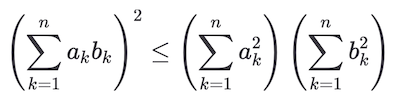
Math written in a source code block with the language declared as math is rendered with
KaTeX.
KaTeX only supports a subset of LaTeX.
#+BEGIN_SRC math
\left( \sum_{k=1}^n a_k b_k \right)^2 \leq \left( \sum_{k=1}^n a_k^2 \right) \left( \sum_{k=1}^n b_k^2 \right)
#+END_SRC
When rendered, the example looks like:
GitLab Query Language (GLQL)
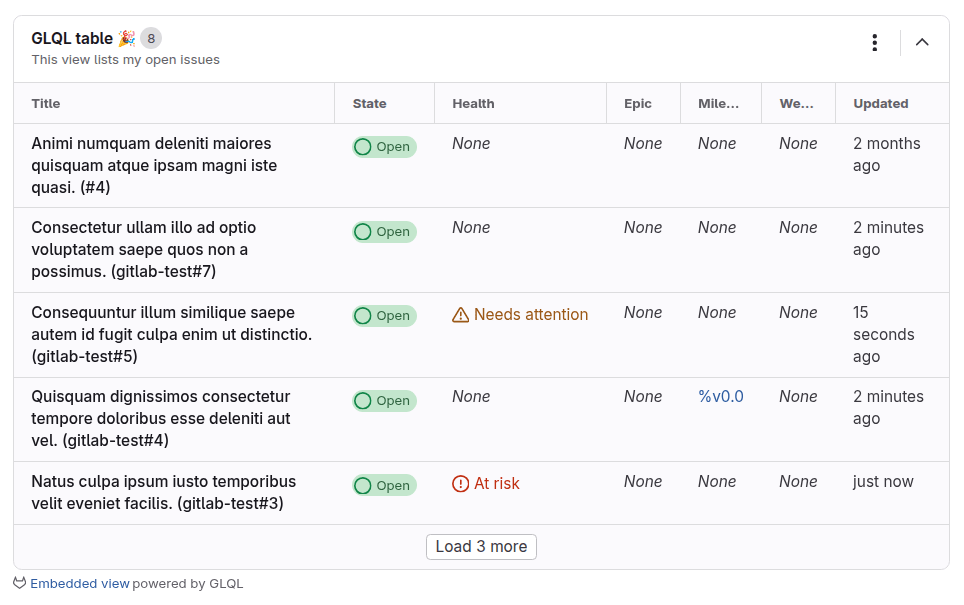
A source code block with the language declared as glql embeds a
GitLab Query Language (GLQL) view:
#+BEGIN_SRC glql
display: table
title: GLQL table 🎉
description: This view lists my open issues
fields: title, state, health, epic, milestone, weight, updated
limit: 5
query: type = Issue AND group = "gitlab-org" AND assignee = currentUser() AND state = opened
#+END_SRC
When rendered, the example looks like: