JaCoCo coverage visualization
- Tier: Free, Premium, Ultimate
- Offering: GitLab.com, GitLab Self-Managed, GitLab Dedicated
Use JaCoCo coverage reports to display line-by-line coverage annotations in merge request diffs. GitLab reads the JaCoCo XML report and annotates each changed line as covered (green) or not covered (red).
Coverage visualization uses the artifacts:reports:coverage_report
keyword. It does not display a coverage percentage in the MR widget or populate coverage history graphs.
To display a coverage percentage, configure the
coverage keyword separately.
Aggregated reports from multi-module projects are not supported. To contribute to aggregated report support, see issue 491015.
Add a JaCoCo coverage job
Add a JaCoCo coverage job when you want to display line-by-line coverage annotations in merge request diffs.
Prerequisites:
- A properly formatted JaCoCo XML file that provides line coverage.
To add a JaCoCo coverage job:
Add a job to your
.gitlab-ci.ymlfile withartifacts:reports:coverage_reportset tojacoco. For example:test-jdk11: stage: test image: maven:3.6.3-jdk-11 script: - mvn $MAVEN_CLI_OPTS clean org.jacoco:jacoco-maven-plugin:prepare-agent test jacoco:report artifacts: reports: coverage_report: coverage_format: jacoco path: target/site/jacoco/jacoco.xmlSet
pathto the location of the generated JaCoCo XML report.
If the job generates multiple reports, use a wildcard in the artifact path.
Coverage indicators
JaCoCo visualization uses
instructions (C0 Coverage),
represented as ci (covered instructions) in reports.
After the pipeline completes, coverage displays in the merge request diff view with these indicators:
- Instructions covered (green): lines with at least one covered instruction (
ci > 0) - No instructions covered (red): lines without any covered instructions (
ci = 0) - No coverage information: lines not included in the coverage report
For example, with this report output:
<line nr="83" mi="2" ci="0" mb="0" cb="0"/>
<line nr="84" mi="2" ci="0" mb="0" cb="0"/>
<line nr="85" mi="2" ci="0" mb="0" cb="0"/>
<line nr="86" mi="2" ci="0" mb="0" cb="0"/>
<line nr="88" mi="0" ci="7" mb="0" cb="1"/>
The merge request diff view displays coverage as follows:
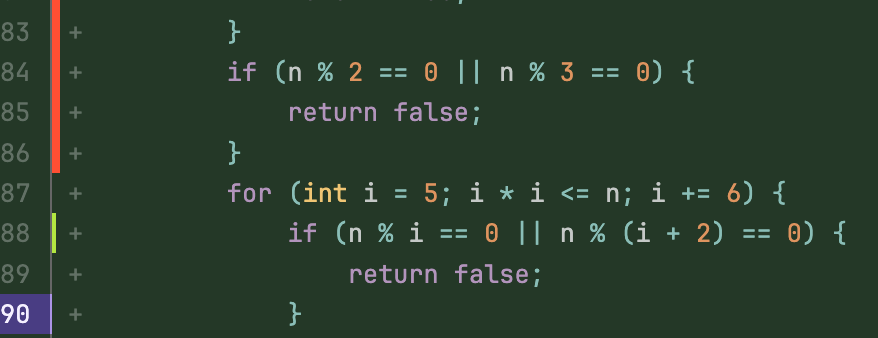
In this example, lines 83-86 show red bars for uncovered code, line 88 shows a green bar for covered code, and lines 87, 89-90 have no coverage data.
Troubleshooting
For troubleshooting coverage visualization, including path resolution failures and annotations that do not appear as expected, see coverage visualization troubleshooting.
Give feedback
JaCoCo coverage visualization is actively being improved. To report issues or suggest improvements, leave your feedback in issue 479804.